Litos
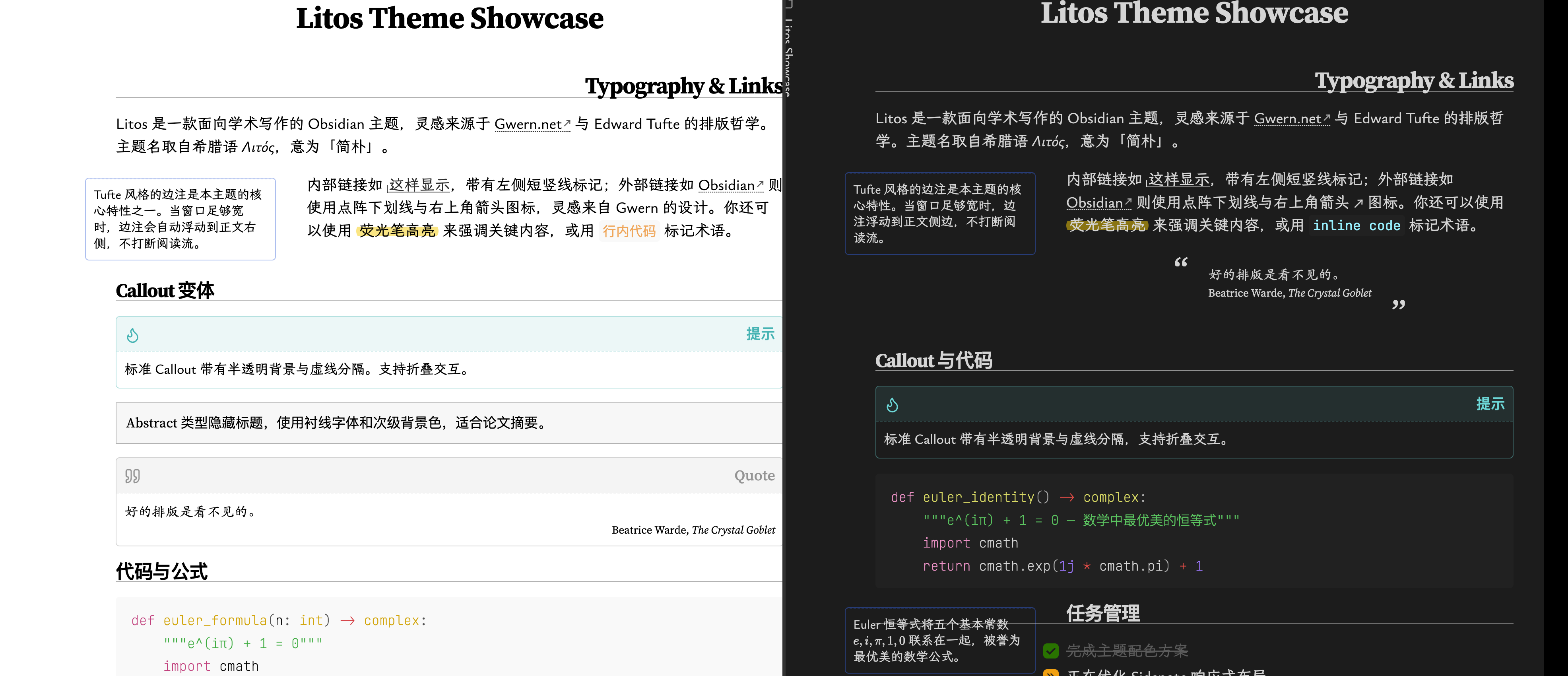
An Obsidian theme with academic aesthetics, Tufte-style sidenotes, and CJK font support.
Features
- Clean, academic-inspired typography
- Tufte-style sidenotes via container queries
- Light and dark mode with HSL accent color system
- CJK (Chinese/Japanese/Korean) font support
- Custom callout variants (revert, blank-container, multi-column)
- Styled checkboxes, tables, and Mermaid diagrams
- Minimal UI (status bar, ribbons, tabs)
Installation
From Community Themes
- Open Settings → Appearance → Themes
- Click Manage and search for Litos
- Click Install and use
Manual
git clone https://github.com/zerokei/Litos \
  <vault>/.obsidian/themes/Litos
Then enable in Settings → Appearance → Themes → Litos.
Recommended Fonts
This theme is designed with the following font stack. Install them for the best experience:
| Purpose | Font |
|---|---|
| Text | LXGW Bright |
| Monospace | JetBrains Mono |
| Accent / Quotes | Source Serif 4 |
| CJK Serif | Source Han Serif SC |
| Fallback Mono | Courier Prime |
Credits
Inspired by: